
I had an idea for a free app sitting in my notes for months before I did anything with it. I assumed building an app meant hiring a developer I couldn’t justify the cost of yet.
Lovable app builder is the reason that tool is now live instead of still sitting in my notes. This review covers what it actually does, what it costs once you look past the sticker price, where it genuinely struggles, and whether it’s worth your time.
Table of Contents
How To Build an App With Lovable App Builder?
You describe the app you want in plain English inside a chat interface. Lovable generates working code, a live preview, and a hosted link within minutes.
You refine it through back and forth messages, the same way you’d brief a developer. You ask for layout changes, new pages, or different logic.
No coding background is required to produce a working first version. Basic logical thinking helps once your app goes beyond a simple tool or landing page.
My Personal Story With Lovable App Builder
I have a background in statistics and business, not software development. Coding was never part of my skill set.
For a long time that felt like a hard wall around any idea that needed more than a blog post to bring to life. Ideas stayed ideas because I didn’t know where to start turning them into something real.
I picked up Lovable through a training module inside Wealthy Affiliate. One of the newer training there walks members through building simple web apps using AI tools like this one.
That’s genuinely where the idea started, not from scrolling through Lovable’s own marketing pages. It came from a training curriculum built around actually using the tool, not a sales page.
I went in expecting to hit a technical wall almost immediately. I didn’t, and that surprised me more than anything else about the process.
Why Lovable App Builder Matters
Building even a basic web tool used to mean hiring a developer or spending months learning to code yourself. That barrier kept a lot of genuinely good ideas stuck as notes on someone’s phone, mine included.
Tools like Lovable are changing that specific problem. Not by replacing developers on serious, large-scale projects, but by making it possible for someone with a real idea and no technical background to actually build something and see whether people use it.
For anyone running a content or affiliate site, that shift matters more than it sounds. A working free tool embedded in your site does something an article alone can’t.
It gives a visitor a reason to interact instead of skimming and leaving. It also gives you something genuinely different to talk about than the fifteen other blogs covering the same topic with the same advice. Here is the free tool I built for my website.
Current Trends in AI App Building for 2026
AI app builders have moved fast over the past year. Early versions produced rough output that usually still needed a developer to clean up before it was usable.
The current generation includes features like Draw-to-Build and direct integration with Claude, alongside a partnership with Google Cloud and a unified credit system across its plans. That’s a genuine jump in capability from where these tools sat even a year ago. Superblocks
The bigger shift is who’s actually using these tools now. It’s no longer just developers prototyping faster.
The free plan keeps projects public and limits custom domain support, while paid plans unlock private projects and custom domains. That structure tells you the product itself has shifted toward supporting real, ongoing small businesses rather than one-off demos.
Marketers, small business owners, and content creators are increasingly the ones building internal tools, lead magnets, and free calculators. These are exactly the kinds of projects that used to sit outside their budget entirely.
What Lovable App Builder Actually Costs
This is the part most reviews gloss over, and it’s exactly the kind of thing your own research should cover before you commit any money.
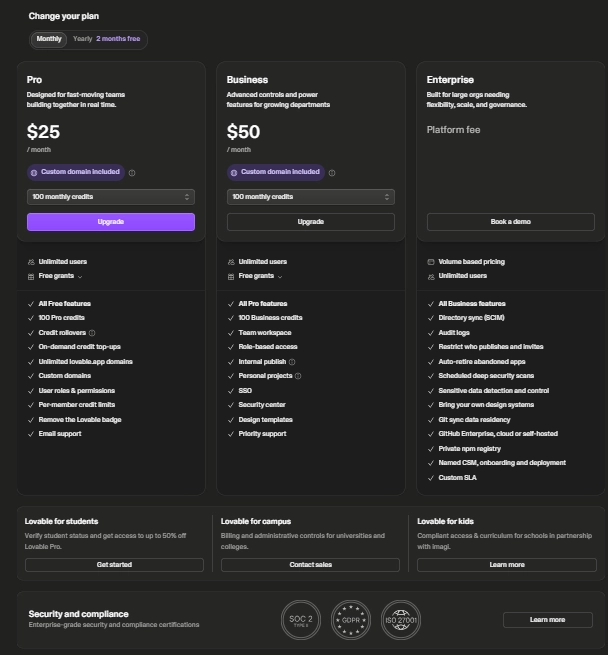
Lovable’s free plan gives you five credits per day, capped at roughly 30 per month. That’s enough to test the tool and build a simple prototype without spending anything. Also, with free plan can build around 5 apps for free.
Beyond that, the Pro plan costs $25 a month for 100 credits. Business runs $50 a month with added features like SSO, and Enterprise pricing is custom for larger organisations.
Paying annually instead of monthly brings the effective Pro cost down to a month. That’s worth knowing if you plan to stick with it past the first month.
The part that actually matters is how those credits get spent. Lovable doesn’t charge per seat or per hour, it charges per action.
Every message you send to build or edit your app burns a different number of credits depending on how complex the request is. That variability is the real source of most billing surprises people report.
A basic structural change might cost around 2 credits. A small cosmetic tweak, like adjusting a button’s border radius, can cost as little as half a credit.
The way you phrase your requests genuinely affects your monthly bill. Vague, repeated back and forth costs more than a clear, well-planned prompt.
If you’re building one focused tool the way I did, the free tier or a single month of Pro is usually enough to get from idea to a published first version. If you’re planning something with logins, a database, and ongoing feature additions, budget for Pro at minimum.
Expect to monitor your credit usage the way you’d watch any other recurring business cost. It’s not a set-and-forget expense once you’re building seriously.
Lovable App Builder vs Other No-Code Options
Lovable isn’t the only AI app builder on the market, and it isn’t automatically the right one for every project. Compared to more traditional no-code platforms like Bubble or Webflow, Lovable trades deep customisation for speed.
You get a working app far faster, but you have less granular control over every design and logic detail. That trade-off suits a focused tool more than a highly customised product.
Against other AI-first builders in the same category, Lovable’s entry-level paid plan sits close in price to comparable tools. Rivals like Bolt start near $20 a month against Lovable’s $25.
The real difference between them tends to show up in how each handles complex logic and how forgiving the credit system is. It’s rarely about the headline price alone.
For a content creator or small business owner building a single tool rather than a full production application, Lovable’s plain-language approach is genuinely the easier starting point. If you’re building something with heavier backend requirements or a larger team, it’s worth comparing at least one alternative first.
Genuine Limitations of Lovable App Builder
No honest review skips this part. Lovable tends to struggle when a project needs highly original UI, predictable monthly costs, or complex backend logic and custom API connections.
If you’re picturing something closer to a full production application than a focused tool, know that going in. The gap between a demo and a production-grade app is real.
Lovable is largely a frontend-first builder. It generates clean interface code and basic app logic, but persistent databases and authentication at real scale still rely on a separate backend service.
For a small tool like mine, the built-in setup was genuinely enough. For anything handling sensitive data at volume, you’d want to look more closely at what sits behind it.
There’s also no self-hosting option, so your app’s hosting stays tied to Lovable’s platform. That’s worth knowing if long-term independence from any single vendor matters to your business.
Step-By-Step Roadmap to Building Your First App With Lovable
Start by writing down the actual problem you want the app to solve, in one or two sentences, before you open Lovable at all. Vague prompts produce vague apps.
The clearer you are about what a user should actually be able to do, the better your first result will be. It also means fewer credits spent correcting direction later.
Once you’re inside Lovable, describe the app in plain language the way you’d explain it to a person, not a machine. I described mine as a tool where someone types in a niche idea and gets back an honest breakdown of whether it could realistically work as a content business.
Lovable generated a working first version from that single description. That first draft won’t be your final product, and it isn’t meant to be.
From there, you refine it in rounds. You’ll ask for layout changes, different wording, new pages, or adjusted logic, the same way you’d give feedback on a written draft.
Each change updates the live preview instantly. You can see immediately whether it actually works the way you pictured it, without waiting on anyone else’s schedule.
Expect several rounds before it feels right. My tool went through changes to the wording on its results page and adjustments to how the report itself was structured.
I also made specific edits to make sure nothing on the page implied a guaranteed outcome, since that mattered to me given the kind of content I publish elsewhere. Getting the tone right took more rounds than getting the layout right.
Once you’re happy with it, Lovable gives you a hosted preview link you can share immediately. You can connect a custom domain once you’re on a paid plan.
Common Mistakes People Make With Lovable App Builder
The most common mistake is treating the first prompt as final instead of as a starting draft. People type one description, get a rough result, and assume the tool isn’t good enough. I refined my app several times until I was satisfied.
The real skill is in the back and forth refinement, not the opening message. Judging the tool by its first output alone misses the entire point of how it’s meant to be used.
Another mistake is skipping the planning step entirely. Jumping straight into Lovable without deciding what the app should actually do leads to wasted rounds fixing structural problems.
A few minutes of upfront thinking would have avoided most of that rework. Those wasted rounds also cost real credits, not just time.
A third mistake, specific to anyone building a tool for a content or affiliate site, is not thinking through what happens after someone actually uses it. A free tool with no next step just becomes a dead end.
Mine leads into a resource section and a nudge toward the training that taught me to build it. That keeps the tool connected to the rest of my site instead of sitting there in isolation.
A fourth mistake is ignoring the credit system until the low-credit warning appears. By the time that alert shows up, you’re already close to the limit.
It’s worth checking your usage periodically rather than only when the app tells you to. That habit alone can save you an unexpected top-up.
My Honest Experience Building an App With Lovable
I went into this expecting to hit a technical wall fairly quickly. That didn’t happen the way I expected.
What did happen was a lot of small, unglamorous refinement rounds. Rewording sections, adjusting how certain edge cases displayed, and making sure the tone matched the rest of my site instead of sounding like generic AI output.
The part that surprised me most was how much the process resembled editing an article rather than writing code. I was describing what I wanted, seeing a result, and adjusting, over and over.
It also wasn’t instant. Getting from a rough first version to something I was genuinely comfortable putting my name to took real time across several separate sessions, not one afternoon.
If you’re expecting a finished, polished product on the first try, you’ll be disappointed. If you’re expecting a genuinely usable starting point you can shape into something real, that’s a fair expectation to have.
Where to Learn More About Lovable App Builder
I learned Lovable through a training module inside Wealthy Affiliate, which is also where most of my affiliate marketing foundation came from. The AI app building content there walks through the same process I used.
It goes from an idea to a working, hosted app without any coding background required. If you want to see what a tool built this way actually looks like in practice, you can try the free niche breakdown I built.
It’s the exact project this entire review is based on. For a broader look at building an online income stream, not just this one tool, my guide to starting affiliate marketing covers the wider picture.
It shows where a tool like this actually fits into a real business, rather than sitting on its own as a side project.
Final Thoughts on Lovable App Builder
Lovable app builder is genuinely capable of taking someone with no coding background from an idea to a working, hosted app. I can say that from having done it, not from reading about it elsewhere.
It isn’t instant, and the credit-based pricing means costs can climb faster than the sticker price suggests if you’re not paying attention. It takes real rounds of refinement and a clear idea of the problem you’re solving before you even open it.
If you’re running a content site and want something more interactive than another article, it’s worth trying. The same goes if you’ve had an app idea sitting unused because you assumed you’d need to hire a developer.
Start on the free tier before you commit to anything paid. The realistic path forward is to start with one small, specific tool idea rather than something ambitious.
Get it working, and build from there. You can browse more tools and guides on the Online Business Roadmap resources page if you want to keep exploring what’s possible with a small, content-based business.
Frequently Asked Questions About Lovable App Builder
Do I need coding experience to use Lovable app builder?
No. You describe what you want in plain language and Lovable generates the code and a working preview. Some technical thinking helps for complex apps, but it isn’t required to get started.
Is Lovable app builder free?
There’s a free tier with a daily credit allowance for testing and simple prototypes. Paid plans start at $25 a month and unlock more credits, private projects, and custom domains, with the effective cost lower if you pay annually.
How long does it take to build an app with Lovable?
A rough first version can appear in minutes. Getting to something polished enough to actually publish took me several separate sessions of back and forth refinement, not a single afternoon.
Can Lovable app builder replace hiring a developer?
For simple tools, calculators, and lead magnets, yes, it genuinely can. For complex, large-scale applications with heavy backend requirements or highly custom design, a developer is still the more realistic option.
Is Lovable app builder good for beginners with no tech background?
Yes, that’s largely the point of it. I have a statistics and business background, not a development one, and was able to build and publish a working tool.
Does Lovable app builder have hidden costs?
The credit system is the thing to watch. Costs vary by how complex each request is, so heavier building and frequent revisions can push your monthly bill above the base plan price if you’re not tracking usage.
Where can I learn how to actually use Lovable app builder properly?
I learned it through a training module inside Wealthy Affiliate, which walks through the same process of going from idea to hosted app.
What happens if I run out of credits mid-build?
You can top up credits or wait for your monthly allowance to refresh, depending on your plan. Business and Enterprise accounts can also set per-user credit limits, which helps if more than one person is building.
Is Lovable app builder suitable for a beginner with zero technical vocabulary?
Yes. You don’t need to know terms like frontend, backend, or database going in. Lovable’s chat interface is built around plain conversational descriptions, and you pick up the vocabulary naturally as you go through rounds of edits.